
Sing Harmony With Yourself – Learn How to Record Your Voice on Your PC and Sing Along With It!
Believe it or not, it is possible to sing harmony with yourself. No surgery required:). I’m doing it in the video below.

Have you ever been singing a song by yourself, and you could just hear the harmonies that were “supposed” to be there but were not? Every time I sing Take It Easy, by The Eagles, I get to the chorus and just have to imagine that I have Don Henley and Timothy B. Schmidt standing beside me. Without the vocal harmonies, the song just doesn’t have the same punch, the same magic.
Some songs just NEED harmony
Imagine trying to perform Kansas’ Carry On Wayward Son, solo! I don’t think so (actually I managed to do it…the intro anyway. Wanna hear it? It’s right here: How To Be Your Own Glee Club – Queen Harmony Demo.)
The same holds true for Bohemian Rhapsody, by Queen (I have not done that one yet:-P). There are certain songs that just cannot or should not be performed without those magical vocals. So what in the world do you do about it if you’re a solo performer?
I’m going to tell you how to record your voice singing all the vocal parts of a song with awesome harmony.
Here’s How To Record Yourself Singing Harmony With Yourself

However, you can record yourself singing harmonies with yourself (yourselves?), right now if you want to, with tools you probably have around the home;-). As long as you have a computer with a sound card, head phones/ear-buds of some kind, and some sort of microphone. Those little $4.00 PC mics are just fine to start….no really, I’m serious. As long as you have the stuff I mentioned, and you want to try this out right now, all you need to do is download the free, open-source audio program called Audacity.
If you want significantly better audio quality, you can use a USB mic like the Samson Q2U for $59.
If you already have some experience you could REALLY crank up the quality using a large-diaphragm condenser mic in combination with an audio interface unit.
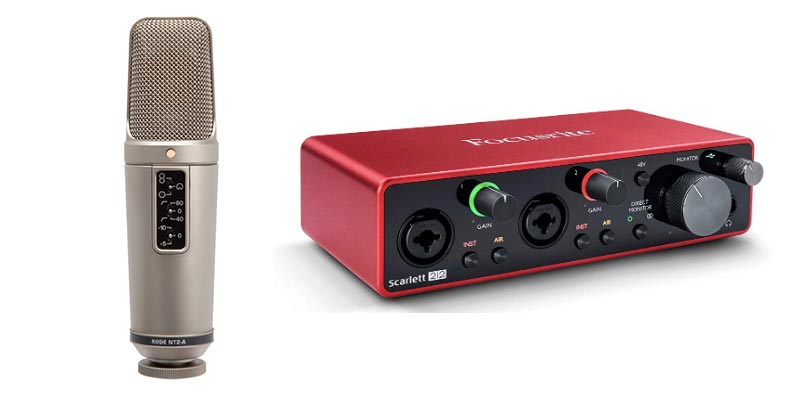
You could also jump to the totally professional recording program called Reaper, which is free for 60 days and only $65 after that, which is completely insane for the quality and capability of this program! I used a Rode NT2-A large-diaphragm condenser microphone and Focusrite Scarlett 2i2 interface for the harmony demo recordings.
Headphones
If you are using a PC mic or USB mic, you can use the same headphones you use with your mobile device, you can plug those into the green (typically) hole in your PC’s sound card (“hole” = “jack” if you insist on using technical terms). If using a laptop, that will be on the side or back. You may have to unplug the speakers first, which is fine. Then plug the microphone into the pink hole/jack in the sound card/laptop.
If you have a setup with a standard mic with an interface unit, you can make things a bit better by using studio headphones, such as the Audio Technica ATH-M20x headphones. These have a larger (1/4 inch) plug that can go into the interface unit.
Settings in Audacity
You just need to set up a couple of things in the software before you start. Open Audacity and go to Edit/Preferences to open the Audacity Preferences window. Put a tick in the box next to “Play other tracks while recording new one.” Then click “OK.”
Next, go into the “Sounds and Devices” window (“Sounds and Audio Devices” in Win XP) from the Windows Control Panel. In Windows 10, accessing the Control Panel takes a few more steps. Just type “Control Panel” in the Cortana search box in the Task Bar, or ask Cortana via voice command to “Open Control Panel.”
In Windows
In Windows 7, 10 or 11, select the Playback tab in the Sound window. Make sure there is a green check mark in your sound card. If not, select it and choose “Set Default.” Then go the Recording tab and choose your microphone and set that to Default. Then while still on the Recording tab, click Properties. Now choose the Levels tab in the Microphone properties window and make sure the mic is set to about 80-90.
The video a few paragraphs below, from our “Harmony Recording Awesomeness” course, will clarify that stuff above:-P
Step 1 – The Melody
Record the melody by pressing button in audacity with the big red dot on it. An audio “track” will appear as if by magic. Start singing into the microphone. When you’re done, click the button in Audacity with the big yellow square (meaning “stop”).
Step 2 – First Harmony Part
Go back to the start of the song by clicking on the button in Audacity with the double purple arrows pointing to the left. Now you can add a harmony by simply pressing the red dot button again and singing along with your recorded voice on the first track.
Make sure you listen to the earlier track(s) on headphones while you’re recording the new track of singing. THIS IS VITAL because you can’t use the speakers or else your microphone will record what’s coming out of them as well as your voice.
You’ll end up with both the first vocal AND your harmony on the second track. This is NOT what you want. Each track must have only one part on it. So when adding tracks, either turn the speakers off, or unplug them and use headphones only.
All The Other Parts
Do this as many times as you want to (there is no practical limit in Audacity), for 3-part or 4-part harmony. Heck, turn yourself into a choir. I once turned myself into an abbey of chanting monks!
That’s all there is to it. You just sang harmony with yourself and didn’t spend a dime!
Other Things To Make It Sound Even Better
There are lots of things you can do to improve the sound once you’re done, such as reduce the noise, pan the voices left and right, etc. If you’re interested in learning about those, and tons of other great things you can do with that recording-studio-you-didn’t-know-you-had, check out our tutorials here.
Other lessons in our course The Newbies Guide to Audio Recording Awesomeness will show you how to create a voice-over with music behind it, how to create loops, and how to edit audio, do multi-track recording, etc. The tutorial covering the stuff we did in the article is also there, in case you were wondering;).
If you want to see and hear some awesome examples of other cool things you can do in the harmony-singing realm, head on over to our Vocal Harmony Demos page.
Below is an excerpt video lesson on how to do this – from our new course Harmony Recording Awesomeness.
For an example of 3-part harmony in a rock song, check out my cover of “That Thing You Do!”
Awesome! I love harmony! A true lost art.
Thanks Ken!
You’re welcome Sam! Me too – I’m actually kind of addicted to it in a way and always have been. I want all my songs to have 3-part harmony. My song-writing partner (who is also my wife:), however, things it should be used sparingly. So she tempers me somewhat. Probably a good thing I suppose.
Beautiful, that sounds just great. You’re a great singer, thanks for the info and help.
Thanks for that Jim! And you are most welcome for the info and whatever help I can provide.
Nice effect there Ken and what a lovely voice … love a bit of CSN&Y … those really were the days 🙂 …
Thanks Jane! Someone on YouTube has requested I do Wasted on the Way and Suite: Judy Blue Eyes next:).
awesome, could you please post just the guitar part as well? I’m excited to try your technique.
Sure. I don’t see why not. I’ll try to get it out today.
Cheers,
Ken
Hi Ed. I just put up the guitar part as requested. Enjoy!
Ken
Beautiful music you’ve made there. You have an amazing voice. 🙂
How did you record it without wearing headphones though, as mentioned in your tutorial?
Thanks!
Thanks Jet. That’s a really good question. The answer is that the video was recorded sort of like a music video and/or musicals, etc. I recorded the singing – with headphones so I could hear the guitar (and other voices on the harmony parts). Then I made the video after it was recorded while listening to the already-recorded music over the speakers. THAT singing was only recorded on the video camera, which also would have picked up the stuff coming out of the speakers. Then when editing the video, I deleted the audio track from the camera and replaced it with the audio from the already-recorded music. Did that make sense?
If I hadn’t been making a video of it, I WOULD have had headphones. And so will you. For folks who don’t know why – it’s because each track you add (like harmonies, extra guitars, etc.) needs to be free of any other audio so it is all alone on its own track. If you don’t wear headphones, you have to listen over the speakers. But then the stuff coming out of the speakers would get recorded onto the harmony track too (through the microphone), which is obviously NOT what you want.
Thanks for the opportunity for me to clarify that, Jet!
Ken
Hi, Ken. I participated in Eric Whitacre’s Virtual Choir IV, but had to make my recording online because every attempt I made to record it to my computer resulted in delay between video and audio. As I am not the experienced or techno-jargon-savvy recording engineer you mention, I have no idea what the problem was/is. Will your tutorials help me find a way around my previous problems?
Thanks
Hi Kathryn. I just watched the TED Talk of the virtual choir and was really impressed. What an awesome idea. But to answer your question, I don’t think you’d need to get a full tutorial course just for this issue (though they are good for learning the basics of good audio recording, but then I’m a bit biased;)). I can give you a couple of ideas right here as to why it happened and how to solve it.
I’m assuming you were recording with a mic plugged into a computer’s sound card? If so, you will get “latency” because those mic input jacks aren’t designed with precision recording in mind. If you use a USB mic, the problem should go away. And if you go to an even better setup – an audio interface unit (connected to your computer via USB, usually) with a large diaphragm condenser mic plugged into the interface, you also shouldn’t have a problem. Just make sure you choose the ASIO device from the “Audio Device” options in your recording software. BTW, ASIO (Audio Stream Input/Output) is the preferred way to get audio into your computer because it’s so fast and was basically designed to solve the very problem you’re talking about.
If you’ve already tried one or both of these methods and somehow still have the delay issue (I can’t think how you would, but I never discount what can go wrong when computers and devices are connected), you can open your video editing program (not sure which one you were using) and literally drag the audio track left or right to match the video. You can do this in Reaper (my preferred audio recording software, which just happens to let you edit audio as well!) if you don’t already have a video editor that shows separate audio and video tracks (like Vegas Movie Studio or a number of others).
I hope that helps. If not, let me know and we can maybe figure it out.
Cheers!
Ken
Great video ! I will follow your instructions on how to do this but first, can you tell me what type of camera you used to film yourself and how you actually combined the sound and video ? And maybe tell me how you put the video on youtube ? 🙂 Sorry for all the questions, i just have literaly no clue, i really want to do this !
Thanks for helpings guys like us Ken , from Matt.
Matt,
I used a Canon Vixia camcorder. I recorded the audio separately. Then I used Vegas video editor and removed the camcorder audio and inserted the previously recorded audio on the video. It was basically recorded like a music video. I hope that helps.
Ken
Thanks a lot, i’ll look into it for further detail.7
Matt
I have several in-depth tutorial videos on how to do this in The Newbies Guide To Audio Recording Awesomeness 2: Pro Recording With Reaper. It’s only $47. Check it out here: https://www.homebrewaudio.com/NewbiesGuide2/
Cheers!
Ken
thanks man!
You’re welcome, Matt!
Hey Ken …
WOW….Pretty amazing stuff YOU can do … AWESOME VIDEO … amazing what can be done these days at home.
Someone had referred me to you .. Google online … sure enough HOMEBREW was there.
REALLY look forward to receiving your next ‘words of wisdom’; as I would consider you to be a ‘Mentor’ in the recording studio.
I had worked in radio after going to college and taking radio broadcasting course.
Worked in the field for about 15 yrs and was laid-off work for the first time … replaced by AUTOMATION (Computer) … FRIEND AND FOE lol
Had worked on the side voicing scripts for local small video/audio recording studios looking for someone experienced reading a script. It took some time to learn how to speed read a script and known where to put emphasis on certain words or the delivery
Looking to get back into V/O industry … already have people waiting for the call that I’m setup and ready to start recording at home and send off by email.
This is where YOU come in Ken …. I need to learn how to use Audacity on home laptop
Already have most of the equipment (older mics, like a AKG D12E (Silver/Black) and regular directional microphones and headphones and a real oldie M-AUDIO FireWire Solo Interface Box (Silver/Grey)
I really enjoyed reading the article on the LATEST USB Interface … need link if possible to order.
Thanks Ken
Gary
Thanks Gary! The USB audio interface I use is the Focusrite Scarlett 2i2. I’m in the middle of a long industrial voiceover job right now – eLearning. I’m using that interface and a Rode NT2-A. Truth be told – for voiceover, I’d rather get myself a Sennheiser MKH-416 (yes, a shotgun mic!), and a Shure SM7 dynamic mic.
Thanks so much for your words! And good luck with getting back into it!
Ken
Hello, is there an app at all that allows you to do these videos harmonizing?
Takitta – no there is no app to do the videos. Nor is there an app that lets you do full harmony parts like this. I believe there are some apps that will create harmonies, but not well enough to to control each part (would only do like a third above or below a target note). Also, even the best harmonizing software (for use on non-mobile devices) still sounds a bit unnatural. No, I sang and recorded each part. Then I created the video by actually filming myself.
This is pretty awesome. I’m gonna try it once back home. Thank you so much for the detailed explanation. Oh, and you have a really good voice (voices).
Thanks! And good luck with your own efforts. Let me know if you have any questions!
you are a genius.the greatest singer and teacher.thanks for coming to this world to bless people like me.i will make you proud soon.thanks so much sir!
Wow. I appreciate that, Piper. And you are very welcome!
Ken
Whats the apps call please
Crystal – there are no apps:). You sing the first part. You listen to it while you sing the next part on a new track (using multitrack software like Audacity or Reaper).
Ken
can i transfer tracks recorded on smartphone to computer? do u recommend PC or Mac? android or Mac? what app do u recommend for smartphone or Mac? Any help greatly appreciated. Thank you for this website!
Yes, you sure can. There are lots of different ways to transfer audio from your phone to your computer. I’m familiar with the iPhone, and you can just “Share” the audio files via email, or to DropBox, etc. If you also have a Mac, you AirDrop it across. As far as types of computer, it doesn’t matter. It is up to your preference. Regardless of what kind of phone you have or application you use to record, there will be an option to email it to yourself, at the very least. Some apps (like IK Multimedia ones, I think) have their own site where the audio files can be uploaded. Then they give you a URL so you can download it.
I hope all that helps!
Cheers,
Ken
Thank you Ken. I’m not too tech savvy when it comes to this stuff, so I apologize if this should already be clear based on the posts so far, but: Can we do this using the sound card that comes with the PC/on the motherboard (not a separate sound card)? Thank you!
Hi Misty. Absolutely yes! There are limitations, such as noise and a bit of latency (a slight delay when adding additional tracks), but these can be worked around. Of course the “how to” methods are covered in the videos.
Cheers!
Ken
I can’t tell you how much I enjoyed watching and listening to this. So much fun! I would love to try it but I’m pretty sure it will be awful. Maybe funny, though! Thank you so much, Ken for putting a huge smile on my face today.
You’re welcome Teresa. My pleasure:).
Hi there.
Is the an app similar to what you have done for Samsung galaxy s6.
Thanks
I did not use an app for this. It’s just recording software on the computer and you connect a mic and sing. That’s it.
Hi all,
There is an application, currently for iPhone and iPad, that allows you to do this. Please search for hashtag #melodylab on Instagram. The app is free and can be downloaded from the App Store. I am currently working on an Android version of the App, hoping to get it out on Google Play very soon!
Have a nice day 😉
Filip
Flip,
Every harmony app or plugin out there that I have tried – though maybe it can do SOME harmony – still cannot do CORRECT harmony that actually sounds good. Not unless it allows you to change chords at the right time and other very specific controls. Does your app do that? I’ll check it out though. Thanks!
i want in how do you get in!
Get in?
Ken
God bless you, my son! Seriously, Ken …. thanks so much.
You’re welcome Mike:). I’m actually releasing a course this coming week called “Harmony Recording Awesomeness,” which you might be interested in. I’ll post here when it’s available and I’ll also send out a notice to the mailing list. Not sure if you’re on that or not. anyway, thanks again!
Ken
I have an instrumental of a song and want to sing with my voice over that music to make a beautiful song.
Can this tutorial help me in doing that?
It will Mohit, yes. It reviews the basics of using either Audacity (free software) or Reaper to put audio on one track and a voice on another separate track, which is how you would do that.
Cheers!
Ken
Ken, I hope to have my own virtual choir one day and am just getting started. This has helped immensely and the great thing is, every member can download Audacity for themselves! So cool. Loved your demo harmony! Great sound!
Thanks!
Carol
Thanks Carol!
Ken
I am really pleased to come across your website. I am trying to record some songs with harmonies and with your explanation I think i can make it. Thanks alot
You’re welcome! So glad it helped. If you have any questions, let me know:).
Cheers!
Ken
Link is not working
Whoa! Thanks for the notice. I’m in the middle of moving my site and those links broke. Fixing now. I’ll let you know when it’s fixed. Sorry about that!
Ken
Wiiliam. It’s working again! Thanks again for alerting me to the problem:).
Cheers,
Ken
Ken, I have been struggling to harmonize with my own voice for some time. I don’t seem to have that much trouble doing it with others. I know this is more of a technical recording blog, but hearing you do this and the link to the broke out tracks has been somewhat of an epiphany for me. Thanks so much for posting this! Also your guitar work and vocals may only be out shined by your recording work. Very good sound. Thanks again Eric
Thanks so much, Eric! You’re very kind. I’m glad this helped you out.
Cheers!
Ken
Hi! Thank you for the instructions on how to use audacity to include harmony with myself. How you were able to put different screens in one video? I’d like to do this for my students as we are an online school now. Thank you for your help.
Hi Amanda. For the video, I used Vegas video software. But you can do this in many video programs such as Premiere. Each screen is a video “track” in Vegas. Then all you have to do is shrink each video track’s display using the Pan/Crop tool. Then you can drag until it is in whichever corner of the screen you’d like it to be in. I hope that helps!
I was shocked to find this article while researching how to sing three part harmony for Helplessly Hoping. Such a beautiful song and well done here. Synchronicity!!!! Thank you!
You’re welcome, Karen! So glad you liked it.
Ken,
Loved your article, and I want to get into singing harmony with myself. Bought Focusrite Scarlett 2i2 and connected my mic (a Shure 56 knock-off) and set up in Audacity. But even with interface level at max, the input waveform is only half-way (far from clipping). Do I need a pre-amp to get more level from my mic?
Hi Tom. If you have a 2i2, then it already has plenty of amplification. So that’s not it. I recommend checking 2 things. First, if you are using Windows 10, go to Control Panel, Hardware and Sound, then Manage Audio Devices in the Sound section. Find your Focusrite in the “Recording” tab and click on it, then click on Properties at the bottom. IN the window the pops up, click the Levels tab. Make sure the percentage slider is all the way to the right “100.” If that is set, then it must be your microphone. I’m not familiar with it. you said Shure 56 knock-off. Are you referring to a 55? (Elvis mic)? Or the Shure Beta 56, which is typically used for drums? It might help if I knew what the exact make and model of the mic is. It could be that it needs phantom power (if it’s a condenser).
I am having a REALLY hard time with this. I’m literally sitting here in tears Wondering why this is so hard. I have the windows 10 version of audacity that I downloaded today. I was so excited to find your article because I need to record a track with harmony for school. But my “big yellow button” is just a black square. There is no button with “2 purple arrows pointing to the left.” I can play the song back from the beginning, but I cannot press the record button then, even though I checked the box to “Play other tracks while recording.” This is insane. It cannot be this difficult. I even tried recording separate tracks in layers and it will not allow me to record from the beginning. Please help me.
Hi Theresa. Yeah, they have changed some things since the version in that video. I’ll update it soon, as I am going through and updating everything from the course this is from. But the big yellow square is, indeed, now black. It does the same thing – “Stop.” What used to e 2 purple arrows is now a left-facing black arrow/triangle with a line on the left side.
I made a quick video for you on how it should work. I just did this on my Mac (though it works on my Windows 10 computer the same). I used my EarPods so the audio quality isn’t great :-P. See if this helps at all – https://www.screencast.com/t/2Ja1VQtwPWZ
Theresa – I just discovered something about the new version of Audacity in Windows 10! In order to record on a second (or 3rd, 4th, etc) track, you click SHIFT-Record, not just Record! this doesn’t seem to be the case with the Mac version. But for Windows, try that and it should work fine. Alternately, you could add a track first and then hit Record. But I think holding down the Shift button and then clicking Record is easier. Sorry I didn’t have that info before.
I wanted to let you know I updated the video and it now shows how to do things in Windows 10 with the latest (as of 2020) version of Audacity. The post is here and the new video is at the bottom.
Hi, my husband knows a lot about recording and we have quite a well equipped studio at home, but we are getting into harmonies and things don’t work quite as they should. The voices are never as clear as what I heard on your video but the worst thing is that when we get them as good as we possibly can the whole thing gets wrecked in the export and we have to start all over again. It is like a shot in the dark? He does all the usual things like separating the voices and so on. Any ideas? Why does the export create havoc with what we so patiently fine tuned?
Hi Francisca. Can you be a bit more specific as to the exact problems? I’m not sure what you mean by “the whole thing gets wrecked” when exporting. Also, what do the recorded voices sound like that they are not “clear?” Are they muffled? Are they too low in volume? Is there too much noise?
One thing to check on the render thing, just in case it is one of the things that can go wrong there, is to make sure you render at the same sampling rate as the project is set to. For example, go to the project settings in Reaper (the little “i” button in the tool bar) and check if your project is set to 48KHz or 44.1KHz. Then in the render screen when rendering, make sure you are rendering to the same sampling rate (either 44.8KHz or 44.1).
Hope that solves at least one of your problems.
It might be better to jump on a Zoom call if this does not solve the problem.
How do you deal with latency? I am following your steps but it is not aligned.
What kind of microphone setup are you using?
I really like the way you applied humor to keep the visitors engaged. It produced the write-up way more fulfilling to browse.
Thanks! That is my goal.