
New Version Of G-Player Gigastudio Sample Player
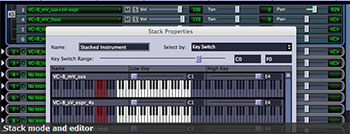
Several years ago I invested in an awesome software synthesizer program called Gigasampler, which later became Gigastudio. The program played sampled instruments via MIDI (see our article What is MIDI? A Big Help in Home Music Recording, That’s What for a review of what MIDI is).
These virtual instruments (yup, see our article Home Recording Awesomeness – Virtual Instruments) sound extremely authentic because they are, in fact, recorded samples from the actual instruments. They are not synthesized. I had dozens of instrument samples for Gigastudio and used them often in my recordings. Other folks had hundreds or thousands of samples made to be compatible with Gigastudio (the files had the .gig extention). And then Gigastudio went away – Poof! Their parent company, Tascam, decided not to support or update or sell the program any longer. Gah! That meant that thousands of people were stuck with huge libraries of sounds and no player.
A few companies came along and offered a player capable of playing these Gigastudio instruments, and one of them is G-Player by soundLib. They now have a new version, G-Player version 2, which offers a free upgrade if you own the first version. If you buy it new, the cost is $149.
I’m going to grab my copy today.
just noticed this- how did g-player turn out?
Neo,
It’s great! A real life-saver for users of GigaStudio.
Ken